What we found when we cleaned up our first TV
Twenty-five app packages, two tracking consents, and an ad channel the household didn’t want. Notes from our pilot on a Samsung AU8000.

Our first test TV was nothing special, which is exactly why we picked it: a 55-inch Samsung AU8000, the Indian-market model UA55AU8000KLXL, running firmware T-NKLAUABC-2310.0, in everyday use in a family living room.
We wanted to answer a simple question before building anything: on an ordinary TV, how much is switched on that the owner never chose? Here’s what we found, and what we changed.
Twenty-five app packages, most of them uninvited
Before touching anything, we took a full inventory of what was installed. The TV had 25 app packages. The household chose to keep eight of them: Netflix, Prime Video, JioHotstar, YouTube, SonyLIV, ZEE5, Spotify, JioCinema.
The household didn’t want the rest: streaming services they didn’t want, voice assistants, and a few “experience” apps. One, YogiFi, was installed twice, in two different versions.
With the owner’s approval, we removed 13 packages: Apple TV, Amazon Alexa, YogiFi, Explore Google Assistant, KidsTV, Tune Station, VOOT, Lionsgate Play, Eros Now, ALTBalaji, Glance, Samsung Experience Plus. That left 12. All eight of the apps the family uses were checked afterwards and were still there.
Two consents nobody remembered giving
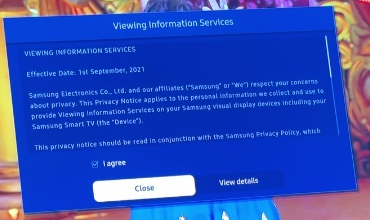
The more important findings were in the settings. Two privacy notices on this TV had their “I agree” boxes ticked:
- Viewing Information Services. This is Samsung’s name for the feature that recognizes what’s playing on your screen and sends information about it back.
- Interest-Based Advertisements. This lets that information shape the ads you see.
Consents like these are usually accepted in one tap during setup, on a screen most people skip through to get to the TV. It’s easy to agree once and never see them again.
We unticked both, and confirmed the change on the advertising one. We photographed each screen before and after, which you can see on our homepage.
One ad channel, switched off
The TV also had Samsung TV Plus enabled, Samsung’s free, ad-supported channel service. Some people like it. This household didn’t want it, so we disabled it.
What we didn’t change, and what we can’t claim
We didn’t factory-reset the TV. We also want to be precise about what this test does and doesn’t show:
- Retained apps were confirmed installed; this does not verify every login or playback feature.
- No measured speed improvement or storage saving is claimed.
- No claim that all ads or telemetry are blocked.
- The setup used developer tools and camera confirmation; this was not a completed phone-app trial.
In other words: we turned off the tracking this TV lets you turn off, and removed what it let us remove. That isn’t the same as making a smart TV private. Some ads and some data collection remain, and we’d rather say so plainly.
What this taught us
None of this was hidden, exactly. Every setting we changed is available to the owner. The problem is that finding them takes time, patience and some knowledge of what each setting really does, and most people reasonably have better things to do with an evening.
That’s the gap we’re building for: a phone app that shows you what’s switched on, lets you choose what goes, and walks you through each step. If you’d like to know whether your TV is supported, check your TV. It’s free to check.
The full test record, with every package name and version, is available to download.
Keep reading

What your smart TV knows about you
Your TV can recognize what’s on its screen and report it. Here’s how that works, what researchers found, and what you can switch off.
How to turn off ACR tracking on a Samsung TV
The two settings that matter most, where Samsung puts them, and what changes when you turn them off.